
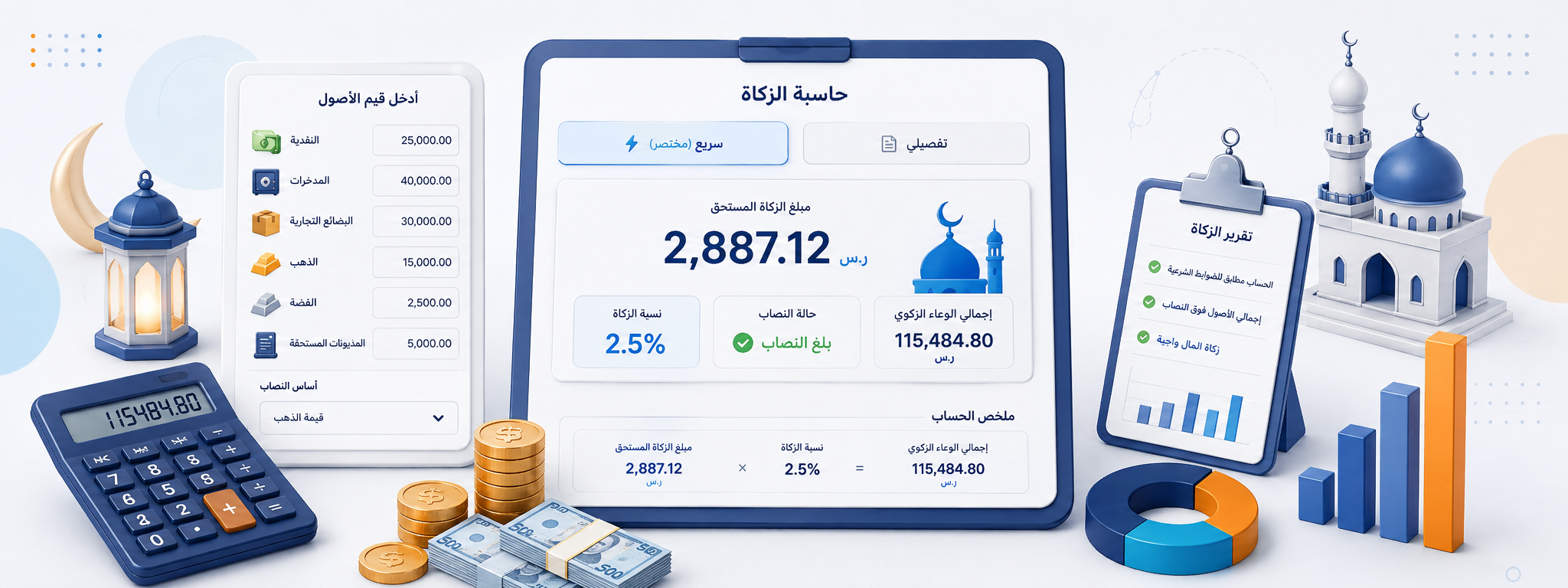
Estimate your Zakat more clearly and understand how the result was calculated
Zakat can be straightforward when your assets are mainly cash and account balances, and more detailed when your wealth includes trade inventory, receivable debts, gold, silver, or other categories. The Digital Zakat Calculator offers both a quick and a detailed calculation mode so you can choose the level of detail that fits your situation.
The tool shows the zakatable amount, whether the selected nisab threshold has been reached, and the estimated Zakat due, along with a summary that explains how the result was reached instead of presenting a number with no context.
The calculator is intended for general arithmetic estimation. The final religious ruling can depend on the type of wealth, ownership, debts, completion of the hawl, and the method used to determine nisab. Detailed cases should therefore be referred to a trusted scholar or recognized religious authority.
What is the difference between quick and detailed calculation?
The difference is not simply the Zakat percentage. It is the amount of detail you enter before arriving at the zakatable total. Quick mode is useful for simpler situations, while detailed mode is better when wealth is spread across several asset types.
Quick calculation
Useful when you want to enter a clear total for cash and balances, compare it with nisab, and estimate Zakat directly.
Detailed calculation
Lets you separate wealth into categories such as cash, trade inventory, receivable debts, gold, and silver before combining the amounts included in the Zakat base.
Final result
Once the assets and nisab are set, the tool shows whether the zakatable amount reaches the selected threshold and the estimated Zakat due under the entered assumptions.
What can be included in the detailed calculation?
Breaking wealth into categories makes the calculation easier to review and helps you check each item before arriving at the total.
Cash and balances
Cash, bank balances, and similar funds that you want to include in your Zakat calculation.
Trade inventory
The value of goods or assets held for trade, assessed according to the religious approach appropriate to your situation.
Receivable debts
The calculator may treat these as a separate field when the nature of the debt and the approach you follow call for including them.
Gold
Its value can be entered in detailed mode when it is part of the wealth you intend to include in the Zakat calculation.
Silver
Displayed separately so its value can be reviewed clearly when building the zakatable total.
Nisab basis
The threshold against which the zakatable amount is compared to determine whether the selected nisab has been reached.
How does the calculator handle nisab?
Before estimating Zakat, the tool compares your zakatable amount with the nisab value you choose. Depending on the page settings, you may be able to enter a nisab amount manually or select a basis linked to gold or silver values.
| Option | How it works | When it is useful |
|---|---|---|
| Enter nisab manually | You provide the nisab value you want the calculation to use. | Useful when you already have a trusted reference value. |
| Gold-based nisab | The threshold is based on the gold value or pricing method used by the tool. | Useful when gold is the religious reference you follow for nisab. |
| Silver-based nisab | The threshold is based on the silver value or pricing method used by the tool. | Useful when silver is the reference you follow. |
| Lower of gold and silver | The tool uses the lower of the two values if that option is available and selected. | Useful when that is the approach you have chosen for your estimate. |
Understanding the Zakat rate shown in the result
In the general calculation of cash and similar zakatable wealth, a rate of 2.5% is commonly used when the relevant conditions, including nisab and hawl, are met. The calculator displays this rate in the summary so you can see how it moves from the zakatable amount to the estimated Zakat due.
Zakatable amount
The total wealth the calculator includes in the base on which Zakat is being estimated.
Nisab status
Shows whether the zakatable amount is equal to or above the nisab value used in the calculation.
Estimated Zakat
The amount produced by applying the selected rate when the assumptions and conditions entered into the calculation are satisfied.
How was the Zakat amount calculated?
It is useful to see how the final number was built instead of accepting it without explanation. The summary therefore walks through the calculation: combine the included assets, compare the zakatable amount with nisab, then apply the rate when the selected assumptions are met.
Add the included assets
The tool collects the values entered in quick or detailed mode.
Build the zakatable amount
The total used for the nisab comparison is shown before Zakat is calculated.
Compare with nisab
The calculator checks whether the total has reached the nisab value you selected or entered.
Estimate the Zakat amount
When the entered assumptions are met, the selected rate is applied and the estimated amount is displayed.
When is quick calculation enough, and when is detailed calculation better?
There is no need to fill in many fields when your assets are simple and clear. On the other hand, reducing everything to one number is less useful when you have several asset categories that need to be reviewed individually.
Use quick calculation when you have a clear total for cash and balances and want a straightforward estimate.
Use detailed calculation when your wealth is spread across cash, trade, gold, silver, debts, or other categories supported by the tool.
If the religious treatment of an asset is unclear, do not try to solve the issue simply by choosing a calculator field. Determine the ruling first, then enter the appropriate value.
How do you use the Digital Zakat Calculator?
A good starting point is to identify the types of wealth you hold, choose the appropriate calculation mode, and then enter the values as they are rather than combining everything manually when you have multiple categories.
Choose the calculation type
Select quick mode for simpler cases or detailed mode when you need to separate asset categories.
Enter your financial values
Add cash, balances, or other supported assets in the appropriate fields.
Set the nisab basis
Choose the available reference you want to use, or enter a manual nisab value if you already have one.
Review the result and summary
Check nisab status, zakatable amount, and estimated Zakat, then review how the result was calculated before copying or sharing it.
Four points that make the calculation easier to review
Make sure the same amount has not been entered in more than one field, which could cause it to be counted twice.
Check the nisab value and the date of the gold or silver price used if your calculation depends on a market price.
Do not assume every debt, asset, gold holding, or trade item has identical religious treatment; the details can change what belongs in the zakatable amount.
Use the calculator for arithmetic and review, then refer religious questions that require a ruling or detailed interpretation to a trusted authority.
Copy or share the Zakat result
After reviewing the figures, you can copy or share the result. This is useful when you want to keep the calculation or discuss it with someone else without entering the values again.
Copy the result
Moves the zakatable amount, nisab status, and estimated Zakat into your clipboard for use in a note or document.
Share the summary
Lets you send the calculation without retyping the figures manually.
Review before sending
Confirm that the values and nisab basis reflect the case you intend to discuss, especially if you are sharing it with a scholar or adviser.
When should you consult a scholar?
Some cases cannot be resolved by adding figures and applying a fixed percentage. The ruling may depend on the type of wealth, how it is owned, when the hawl is completed, and the nature of a debt or asset. In these cases, the calculator can organize the numbers but cannot settle the religious ruling.
Frequently asked questions about the Digital Zakat Calculator
What is the difference between quick and detailed calculation?
What does nisab mean in the calculator?
Can I enter the nisab value manually?
Why can the cash value of nisab change?
Is Zakat always calculated at 2.5% in this tool?
Can trade inventory be included?
Are debts included in the zakatable amount?
Is the calculator result a religious fatwa?
When should I consult a scholar?
You may also find these useful
Continue with a related calculator, or return to the full calculator collection to explore more everyday tools.
