
Calculate an hourly rate and project price that better reflect how freelance work actually operates
Many freelancers begin pricing with one question: “What is everyone else charging?” Market rates matter, but the right price for you also depends on the income you want to earn, the expenses you need to cover, the time you can realistically bill to clients, and the buffer you need for the unexpected.
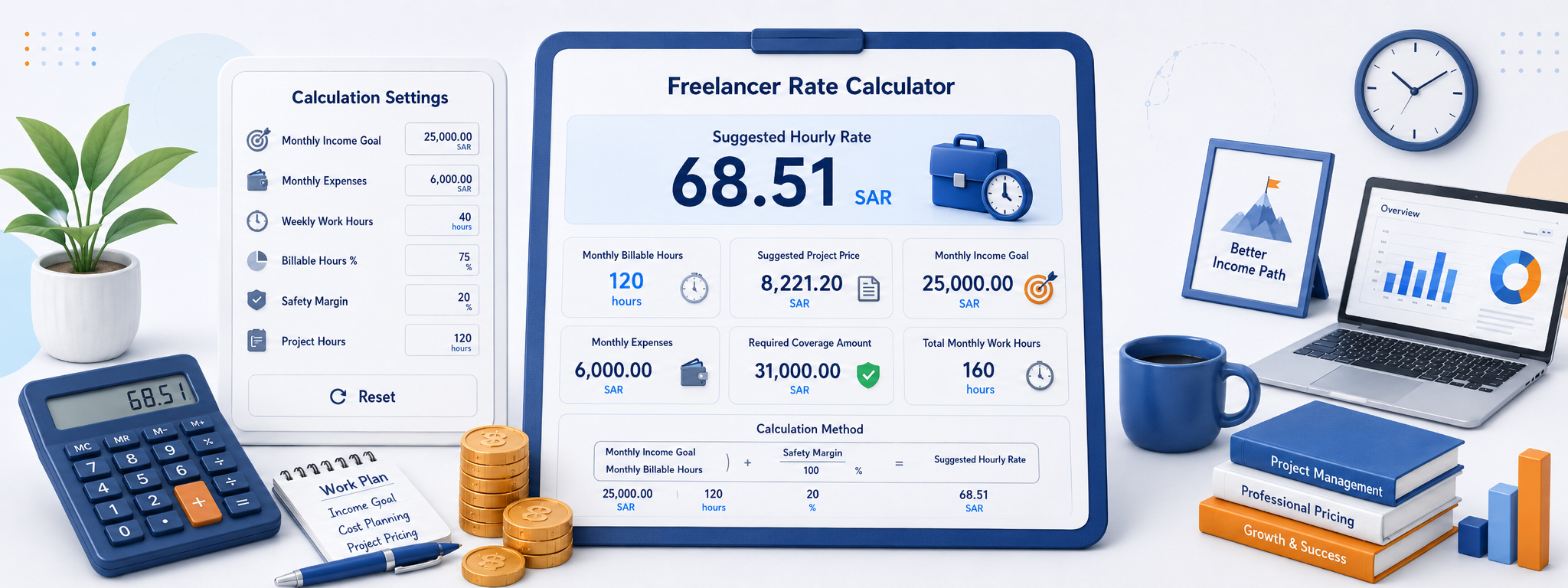
The Freelance Rate Calculator turns those factors into practical figures: a suggested hourly rate, estimated billable hours per month, and an estimated project price based on the number of project hours you enter.
The result is not a mandatory price or a replacement for market knowledge. It is a practical starting point that helps you see whether your current pricing can support your work instead of valuing your time below its real cost.
Why is freelance pricing harder than calculating a monthly salary?
Employees are paid for working time that includes meetings, planning, administration, and periods that do not directly produce billable output. Freelancers usually cannot invoice every hour they work because part of their week goes into communication, marketing, proposals, bookkeeping, revisions, and follow-up.
Not every working hour is billable
You may work 40 hours a week, but some of that time goes into tasks you cannot invoice directly to a client.
Expenses belong in the price
Software, subscriptions, internet, equipment, services, and operating costs all influence the minimum amount your work needs to cover.
Your income target is not the same as revenue
If you want a specific personal income, the amount you invoice needs to be higher when business and operating costs sit on top of that goal.
Projects rarely go exactly to plan
Revisions, meetings, delays, and scope changes can add time that was not obvious in the first estimate.
Experience changes value
An experienced freelancer may solve a problem faster, so becoming more efficient should not automatically force the price down.
The market still matters
The calculator helps define your financial needs, while service type, client profile, competition, and market conditions still matter when you set the final price.
What do the Freelance Rate Calculator inputs mean?
The inputs are designed to translate the way you actually work into numbers. The closer your assumptions are to reality, the more useful the result becomes when reviewing your rates.
| Input | What it means | How it affects pricing |
|---|---|---|
| Target monthly income | The amount you want your freelance work to generate for you each month. | A higher goal requires more revenue, more billable hours, a higher hourly rate, or a combination of all three. |
| Monthly expenses | The personal or professional costs you want your freelance income to cover. | They increase the amount your work needs to generate before the pricing becomes sustainable. |
| Working hours per week | The number of hours you plan to dedicate to work each week. | This sets the total time available before the billable percentage is applied. |
| Billable-hours percentage | The percentage of your working time that can realistically be charged to clients. | A lower billable percentage generally means a higher hourly rate is needed to cover the same monthly target. |
| Buffer | An allowance for extra time, uncertainty, or unexpected project costs. | It gives the suggested price some breathing room instead of assuming every project goes perfectly. |
| Project hours | The number of hours you expect the current project to take. | The calculator uses this figure to estimate a project price from the suggested hourly rate. |
What are billable hours?
Billable hours are the hours you can directly connect to paid client work. They are not always the same as total working hours because running a freelance business includes administrative and sales work that is not invoiced separately.
Total working hours
Everything you do during the working week: client delivery, communication, planning, research, administration, and follow-up.
Billable hours
The part of your time that can be assigned directly to paid client services or projects.
Project hours
Your estimate of how long a specific project will take, which the calculator uses to build a suggested project price.
How does a monthly income target become an hourly rate?
Imagine you have a monthly income target, fixed expenses, and a set number of working hours, but only 60% of your time can actually be billed. The calculator combines the amount you need to cover and spreads it across the billable hours available, while also taking your selected buffer into account.
Monthly target
The income level you want your freelance work to produce each month.
Expenses
Added to the target so the hourly rate does not focus on income while leaving operating costs to be paid separately from your pocket.
Amount that needs to be covered
The total revenue requirement before that amount is spread across your actual billable time.
Monthly working hours
An estimate of the total time you dedicate to work in a month before billable and non-billable time are separated.
Monthly billable hours
The portion of time the calculator uses to distribute the amount you need to cover.
Suggested hourly rate
An estimated rate for each billable hour based on the income, cost, time, and buffer assumptions you entered.
How is the suggested project price calculated?
Once you have a useful hourly-rate estimate, the calculator applies the number of project hours you enter to create a starting project price. This can be practical, but it does not mean every project should be priced by hours alone.
Why include a pricing buffer?
Projects do not always follow the original estimate. A client may request another revision, a technical issue can appear, or research can take longer than expected. A buffer helps prevent the price from being built around a best-case scenario only.
Do not use a buffer to hide weak time estimates. Start with a realistic project scope and hours estimate first.
The less predictable a project is, the more buffer you may need compared with a repeatable project whose steps you already know well.
Revision limits and scope should still be stated clearly in your agreement with the client rather than relying on a pricing buffer alone.
When should you adjust the suggested rate?
The hourly rate gives you a practical baseline based on your time and costs, but it cannot know everything about a project. The final price may reasonably move up or down based on the work, market, and client.
Specialization
Specialized or scarce skills can carry more value than general services even when the work takes a similar amount of time.
Responsibility
A project with a larger impact on a client's business may deserve pricing that reflects responsibility as well as hours.
Urgency
Rush work can disrupt your schedule or force other projects to move, which may justify a different price.
Number of revisions
Unlimited or poorly defined revision rounds can significantly increase the real time a project consumes.
Usage rights
Some creative work or content can have different value depending on how broadly the client is allowed to use it.
Client and market
What a market can support differs by industry, geography, and client type, so the calculator should be treated as an internal reference rather than a fixed market price.
How do you use the Freelance Rate Calculator?
Start with realistic numbers, then change one variable at a time. This lets you see which factor is pushing your rate up or down instead of relying on a single unexplained result.
Set your target and expenses
Enter the monthly income you want to reach and the costs your freelance work needs to cover.
Set working and billable time
Enter your weekly working hours and the percentage you can realistically bill to clients.
Add a buffer and project hours
Enter an appropriate buffer and your project-hour estimate to create a starting project price.
Review and adjust
Read the hourly and project rates, then compare them with the service, market, and level of responsibility before sending a quote.
Test several scenarios before settling on your rate
One of the calculator's most useful roles is showing how price changes when the way you work changes. You may discover that the issue is not your income target at all, but low billable utilization or higher-than-expected expenses.
Increase the billable-hours percentage to see how better time management could reduce the hourly rate needed to hit the same goal.
Test higher and lower expense scenarios to understand the point at which your current pricing becomes uncomfortable.
Change only the project hours to see how your hourly baseline translates into projects of different sizes.
Compare the result with your current rate. If the gap is large, review your assumptions first, then consider whether your pricing or billable utilization needs to change.
Copy or share the calculation
Once you reach a scenario that makes sense, you can keep the summary for future reference, project comparisons, or use when preparing a new quotation.
Copy the result
Moves the hourly rate, billable hours, and project estimate into your clipboard for use in notes or pricing documents.
Share the calculation
Lets you send the scenario to a colleague or partner without retyping the figures.
Reset
Clear the previous inputs when you want to build a new scenario from scratch.
What can the calculator not decide for you?
The calculator knows your numbers, but it does not know the quality of your experience, how rare your skills are, how valuable the project is to the client, or how competitive your market is. The final price still needs professional judgment.
Frequently asked questions about the Freelance Rate Calculator
How do I work out the right hourly rate as a freelancer?
What is the difference between working hours and billable hours?
Why does the suggested hourly rate rise when my billable percentage falls?
Should I include personal expenses?
What is the purpose of the buffer?
Is project price always hourly rate multiplied by project hours?
Do I have to use the suggested hourly rate exactly as shown?
What if the suggested rate is much higher than what I charge now?
Is the calculator suitable for every freelance field?
You may also find these useful
Continue with a related calculator, or return to the full calculator collection to explore more everyday tools.